---
title: Open a Webpage Overview
description: Learn more about how to open a webpage in ActBlue Field Tools.
---
[Skip to content](https://help.actblue.com/hc/en-us/open-a-webpage-overview-impactive-help-center#main-content)
English - United States
Show submenu for translations

Open main navigation
Close main navigation
- English - United States
Show submenu for translations
- [Contact us](https://help.actblue.com/hc/en-us/requests/new)
[Contact us](https://help.actblue.com/hc/en-us/requests/new)
How can we help you?
- There are no suggestions because the search field is empty.
1. [ActBlue Support Documentation](https://help.actblue.com/hc/en-us)
2. [ActBlue Field Tools (formerly Impactive by ActBlue)](https://help.actblue.com/hc/en-us/actblue-field-tools-formerly-impactive-by-actblue)
3. [Other Actions (Social Sharing, Open Webpage)](https://help.actblue.com/hc/en-us/actblue-field-tools-formerly-impactive-by-actblue#other-actions-social-sharing-open-webpage)
# Open a Webpage Overview
**Action Description:**
The Open a Webpage Action allows you to send a link to your users, redirecting them out of the ActBlue Field Tools App and into a site of your choosing.
[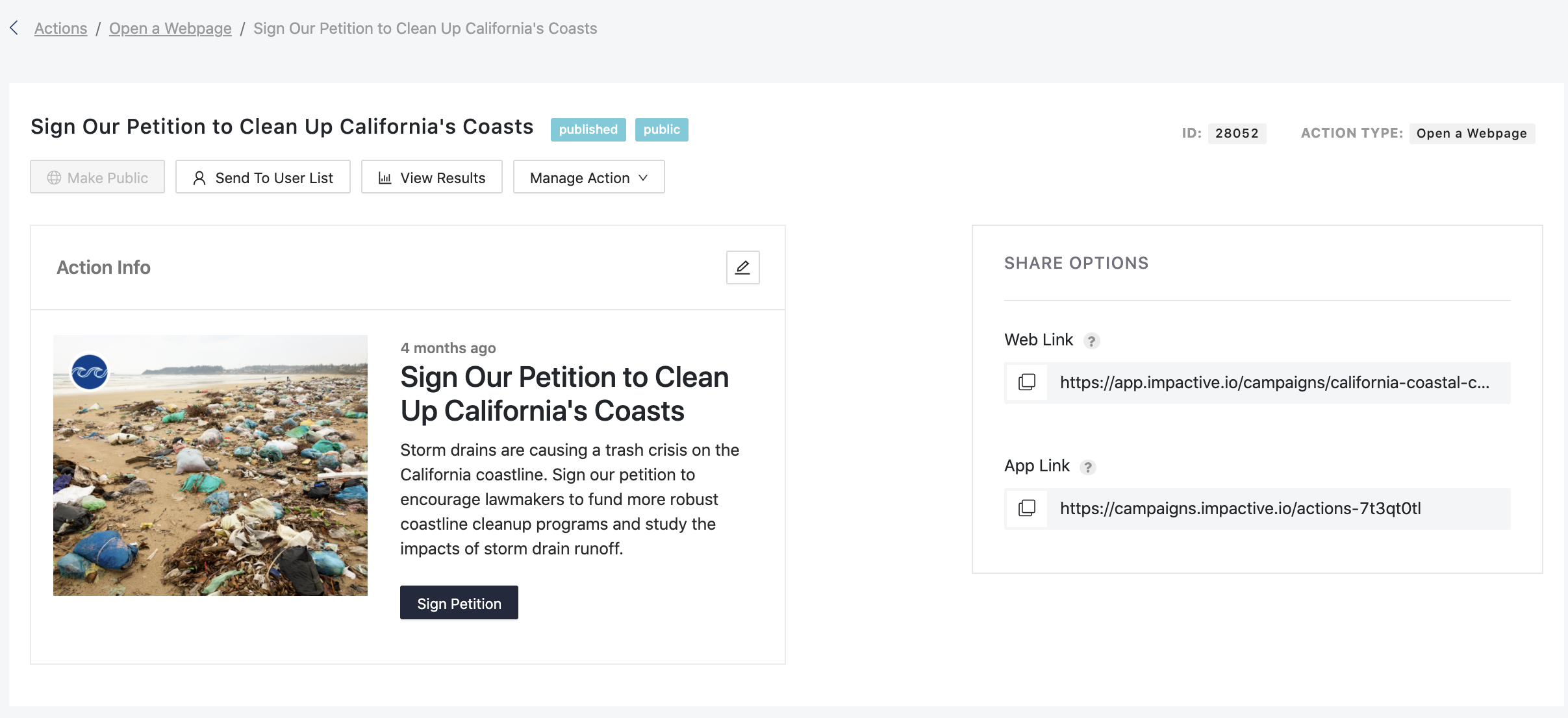](https://impactive-8d45e16b27c1.intercom-attachments-1.com/i/o/1031625115/183768ec3508550cd80534dd/Screen_Shot_2021-11-29_at_1_46_06_PM.png?expires=1776792600&signature=ddf956e85b79d2767c26c684538d1695cb5b26cdda317fcbed72b7d3d72216ea&req=dSAkF898mIBeXPMW1HO4zQCSKTVAwOTKDg3787B%2Br7uSzWHI73UToefDBamB%0Agq%2BJJ8Xn3M1yeowzRkw%3D%0A)
**Creating the action:**
- Navigate to the admin panel and click on Open a Webpage, then click on create Create Action.
- Write a title and action description to let your users know what this action is about.
- Write the custom message you'd like your users to see, which will explain why you're asking them to navigate to a webpage outside of the Field Tools App. Then paste in the link you'd like them to click on.
- Before finishing the action, decide if you want to publish it now or schedule it to be published at a certain time.
- You can track the performance of your Social Sharing campaign using the results page built into your action page in the admin dash.
- [Donors & Grassroots Fundraisers](https://help.actblue.com/hc/en-us/donors-grassroots-fundraisers#main-content)
- [Contributions](https://help.actblue.com/hc/en-us/donors-grassroots-fundraisers#contributions)
- [ActBlue Express Accounts](https://help.actblue.com/hc/en-us/donors-grassroots-fundraisers#actblue-express-accounts)
- [Raising Money for Campaigns and Organizations](https://help.actblue.com/hc/en-us/donors-grassroots-fundraisers#raising-money-for-campaigns-and-organizations)
- [About ActBlue](https://help.actblue.com/hc/en-us/donors-grassroots-fundraisers#about-actblue)
- [Other](https://help.actblue.com/hc/en-us/donors-grassroots-fundraisers#other)
- [Core ActBlue](https://help.actblue.com/hc/en-us/core-actblue#main-content)
- [Getting Started with Your Core Dashboard](https://help.actblue.com/hc/en-us/core-actblue#getting-started-with-your-core-dashboard)
- [Managing & Granting Access to Your Core Dashboard](https://help.actblue.com/hc/en-us/core-actblue#managing-granting-access-to-your-core-dashboard)
- [Creating & Managing Core Contribution Forms](https://help.actblue.com/hc/en-us/core-actblue#creating-managing-core-contribution-forms)
- [Managing Grassroots Fundraising for Core Donors](https://help.actblue.com/hc/en-us/core-actblue#managing-grassroots-fundraising-for-core-donors)
- [Working with Core Contribution Forms](https://help.actblue.com/hc/en-us/core-actblue#working-with-core-contribution-forms)
- [Core Contribution Form Features](https://help.actblue.com/hc/en-us/core-actblue#core-contribution-form-features)
- [Selling Tickets & Merchandise with Core](https://help.actblue.com/hc/en-us/core-actblue#selling-tickets-merchandise-with-core)
- [Refunding & Managing Core Contributions](https://help.actblue.com/hc/en-us/core-actblue#refunding-managing-core-contributions)
- [Reporting & Accessing Your Core Fundraising Data](https://help.actblue.com/hc/en-us/core-actblue#reporting-accessing-your-core-fundraising-data)
- [Signing In & Using 2FA in Core](https://help.actblue.com/hc/en-us/core-actblue#signing-in-using-2fa-in-core)
- [Managing Your Merchant Account in Core](https://help.actblue.com/hc/en-us/core-actblue#managing-your-merchant-account-in-core)
- [Activating & Managing Express Lane in Core](https://help.actblue.com/hc/en-us/core-actblue#activating-managing-express-lane-in-core)
- [Fundraising Strategy in Core](https://help.actblue.com/hc/en-us/core-actblue#fundraising-strategy-in-core)
- [Integrations & Analytics in Core](https://help.actblue.com/hc/en-us/core-actblue#integrations-analytics-in-core)
- [Other Core FAQ](https://help.actblue.com/hc/en-us/core-actblue#other-core-faq)
- [Using Call Time in Core](https://help.actblue.com/hc/en-us/core-actblue#using-call-time-in-core)
- [Raise by ActBlue](https://help.actblue.com/hc/en-us/raise-by-actblue#main-content)
- [Getting Started with Your Raise Dashboard](https://help.actblue.com/hc/en-us/raise-by-actblue#getting-started-with-your-raise-dashboard)
- [Raise FAQs](https://help.actblue.com/hc/en-us/raise-by-actblue#raise-faqs)
- [Managing & Granting Access to Your Raise Dashboard](https://help.actblue.com/hc/en-us/raise-by-actblue#managing-granting-access-to-your-raise-dashboard)
- [Managing Your Merchant Account in Raise](https://help.actblue.com/hc/en-us/raise-by-actblue#managing-your-merchant-account-in-raise)
- [Creating & Managing Raise Fundraising Pages](https://help.actblue.com/hc/en-us/raise-by-actblue#creating-managing-raise-fundraising-pages)
- [Managing Your Conduit Account In Raise](https://help.actblue.com/hc/en-us/raise-by-actblue#managing-your-conduit-account-in-raise)
- [Reporting & Accessing Your Raise Fundraising Data](https://help.actblue.com/hc/en-us/raise-by-actblue#reporting-accessing-your-raise-fundraising-data)
- [ActBlue Field Tools (formerly Impactive by ActBlue)](https://help.actblue.com/hc/en-us/actblue-field-tools-formerly-impactive-by-actblue#main-content)
- [Getting Started](https://help.actblue.com/hc/en-us/actblue-field-tools-formerly-impactive-by-actblue#getting-started)
- [Contacts](https://help.actblue.com/hc/en-us/actblue-field-tools-formerly-impactive-by-actblue#contacts)
- [Users](https://help.actblue.com/hc/en-us/actblue-field-tools-formerly-impactive-by-actblue#users)
- [Data and Integrations](https://help.actblue.com/hc/en-us/actblue-field-tools-formerly-impactive-by-actblue#data-and-integrations)
- [Training Volunteers](https://help.actblue.com/hc/en-us/actblue-field-tools-formerly-impactive-by-actblue#training-volunteers)
- [Texting (Peer-to-Peer, Broadcast, and Automated)](https://help.actblue.com/hc/en-us/actblue-field-tools-formerly-impactive-by-actblue#texting-peer-to-peer-broadcast-and-automated)
- [Phone Banking](https://help.actblue.com/hc/en-us/actblue-field-tools-formerly-impactive-by-actblue#phone-banking)
- [Friends and Family Messaging (Relational)](https://help.actblue.com/hc/en-us/actblue-field-tools-formerly-impactive-by-actblue#friends-and-family-messaging-relational)
- [Canvassing](https://help.actblue.com/hc/en-us/actblue-field-tools-formerly-impactive-by-actblue#canvassing)
- [Voter Registration](https://help.actblue.com/hc/en-us/actblue-field-tools-formerly-impactive-by-actblue#voter-registration)
- [Forms](https://help.actblue.com/hc/en-us/actblue-field-tools-formerly-impactive-by-actblue#forms)
- [Other Actions (Social Sharing, Open Webpage)](https://help.actblue.com/hc/en-us/actblue-field-tools-formerly-impactive-by-actblue#other-actions-social-sharing-open-webpage)
- [Best Practices & Ideas](https://help.actblue.com/hc/en-us/actblue-field-tools-formerly-impactive-by-actblue#best-practices-ideas)
- [Billing & Account Management FAQs](https://help.actblue.com/hc/en-us/actblue-field-tools-formerly-impactive-by-actblue#billing-account-management-faqs)
- [Frequently Asked Questions](https://help.actblue.com/hc/en-us/actblue-field-tools-formerly-impactive-by-actblue#frequently-asked-questions)
- [ActBlue Website Builder (formerly Hey Victor)](https://help.actblue.com/hc/en-us/actblue-website-builder-formerly-hey-victor)
- [Other FAQs](https://help.actblue.com/hc/en-us/other-faqs#main-content)
- [Applying for a New Account FAQs](https://help.actblue.com/hc/en-us/other-faqs#applying-for-a-new-account-faqs)
- [Sign In & 2FA FAQs](https://help.actblue.com/hc/en-us/other-faqs#sign-in-2fa-faqs)
- [Post-Election FAQs](https://help.actblue.com/hc/en-us/other-faqs#post-election-faqs)
- [ActBlue FAQs](https://help.actblue.com/hc/en-us/other-faqs#actblue-faqs)
[](https://secure.actblue.com/)
Copyright © 2025, ActBlue