
Create an ActBlue Express account, or log in if you already have one.
Donors who haven’t saved their personal information in their ActBlue Express account can't view their contribution history.
Select “History” from the left navigation bar to view your past contributions.
You can see the following information for each of your donations:
- The donation amount
- The group you gave to
- The date you gave
- Payment method
- Whether it was a charitable 501(c)(3) donation
You can change the timeframe for the donations shown by clicking on the dropdown and choosing a date range. Pick an option in the dropdown menu or select a custom timespan on the calendar.
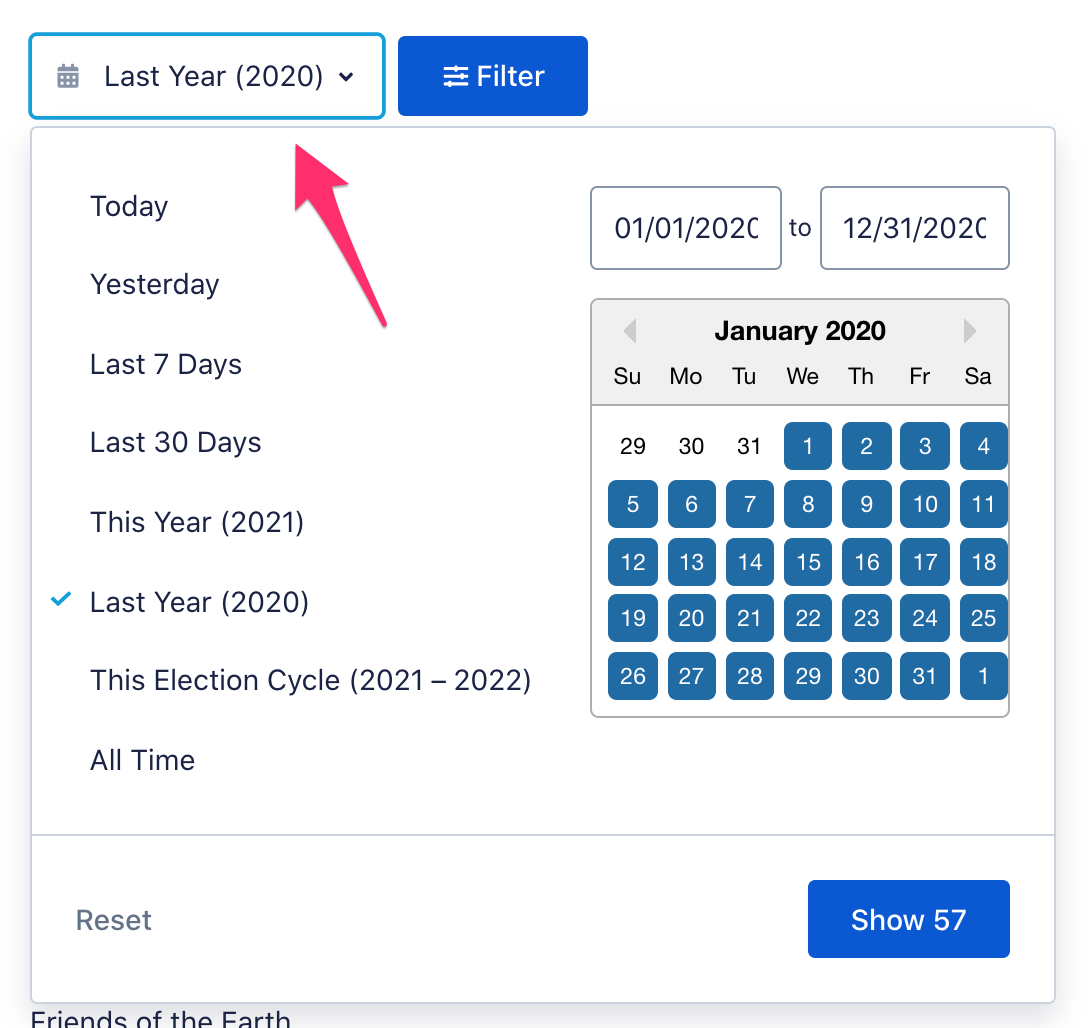
Click the “Filter” button to filter by recipient, charitable 501(c)(3) donations, or recurring donations.

Use the dropdown menu on the right for different sorting options.

Next to each donation is a button you can click to donate again to that same group. There is also an arrow that, once clicked, will provide more options to edit your contribution and show further details. From here you can either resend yourself the email receipt for your contribution or request a refund.

When you resend yourself your receipt, it will go to the email address you used when donating.

Select “Insights” from the left navigation bar to view your all-time giving history, starting with how much you have donated through ActBlue and a list of all contributions organized by recipients.
