---
title: How do I know my money is going to the candidate or organization I donated to?
description: Learn how ActBlue helps campaigns and organizations raise funds.
---
[Skip to content](https://help.actblue.com/hc/en-us/articles/16869089779095-how-do-i-know-my-money-is-going-to-the-candidate-or-organization-i-donated-to#main-content)
English - United States
Show submenu for translations

Open main navigation
Close main navigation
- English - United States
Show submenu for translations
- [Contact us](https://help.actblue.com/hc/en-us/requests/new)
[Contact us](https://help.actblue.com/hc/en-us/requests/new)
How can we help you?
- There are no suggestions because the search field is empty.
1. [ActBlue Support Documentation](https://help.actblue.com/hc/en-us)
2. [Donors & Grassroots Fundraisers](https://help.actblue.com/hc/en-us/donors-grassroots-fundraisers)
3. [About ActBlue](https://help.actblue.com/hc/en-us/donors-grassroots-fundraisers#about-actblue)
# How do I know my money is going to the candidate or organization I donated to?
Campaigns and organizations use ActBlue as their online fundraising platform. When you donate on ActBlue, your money goes straight to the candidate or organization listed on the form.
ActBlue contribution forms always list the groups they benefit so you will know where your money is going. Charitable donations made through this form are received and processed by ActBlue Charities Inc., a 501(c)(3) tax-exempt organization formed to democratize charitable giving. The merchant of record for this transaction is ActBlue Charities Inc. We subsequently give your contribution to the organization or cause that you have selected on the contribution form.
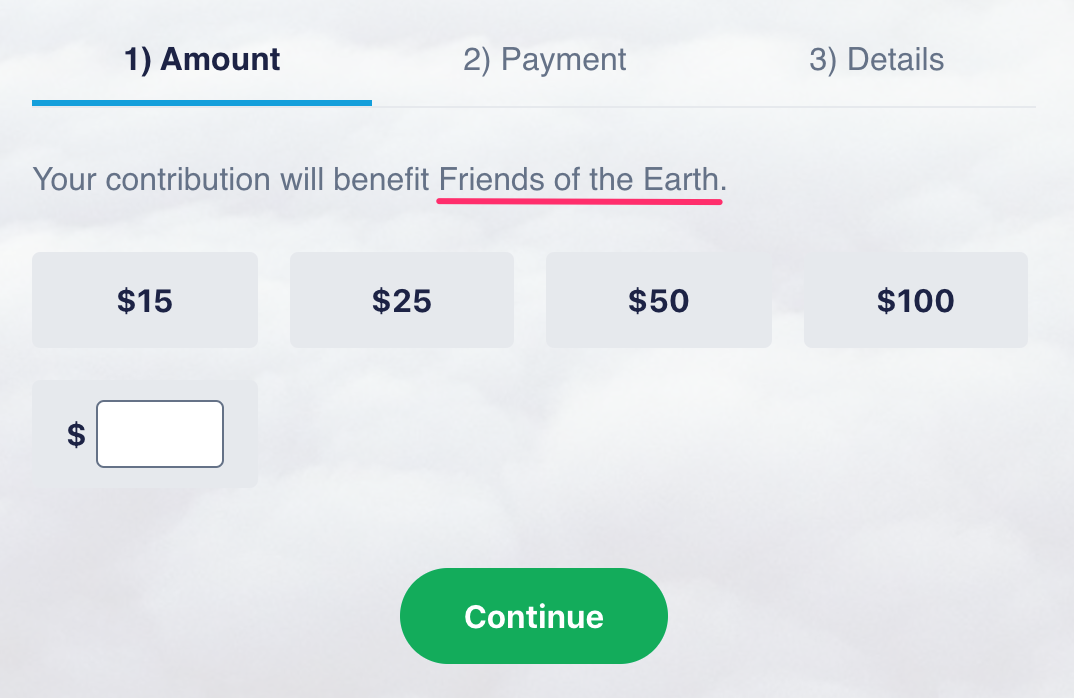
You can use the FEC’s website to confirm your donation if you’ve given to a federal campaign or organization.
As federal law requires, ActBlue reports and itemizes (lists the donor name and information) every federal donation that comes through our platform to the Federal Election Commission, including those under $200.
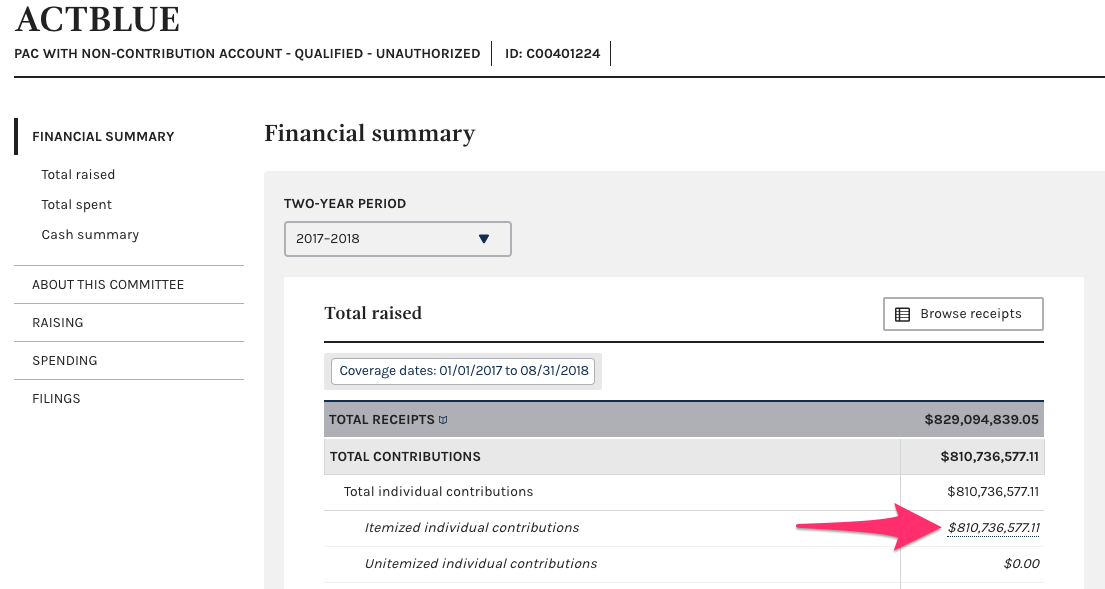
To confirm your donation, [go to the ActBlue committee overview.](https://www.fec.gov/data/committee/C00401224/) On the “Financial summary” page, click the link for “Itemized individual contributions.”
You will land on a page of individual receipts. The “Recipient” column will list ActBlue because of our conduit structure.

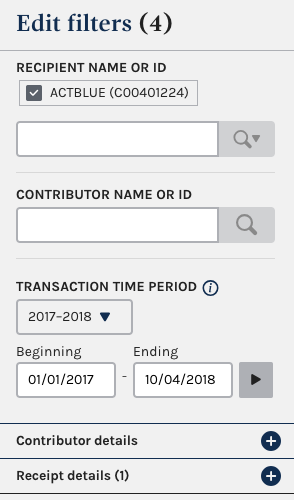
To find your contributions, use the “Edit filters” menu on the left to search for your name (in the “Contributor Name or ID” field) or other identifying details.
Contributions will only appear once the reporting deadline passes and the FEC processes the data.
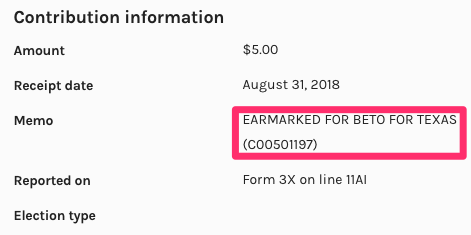
When you find your contribution, select the gray arrow to the right of the individual dollar amount to confirm the campaign or organization you donated to. In the window on the right side of your screen, you’ll find the campaign or organization under “Contribution information.”

We pass along a processing fee on contributions to the groups using our platform.
Completing a contribution involves expenses to process your credit card. We’re legally required to pass along processing costs to the campaign so that we do not make in-kind contributions to them.
As a nonprofit, we rely on tips from donors to pay our bills. You can add an optional tip for us when you fill out a contribution form.
- [Donors & Grassroots Fundraisers](https://help.actblue.com/hc/en-us/donors-grassroots-fundraisers#main-content)
- [Donor Guides](https://help.actblue.com/hc/en-us/donors-grassroots-fundraisers#donor-guides)
- [Contributions](https://help.actblue.com/hc/en-us/donors-grassroots-fundraisers#contributions)
- [ActBlue Express Accounts](https://help.actblue.com/hc/en-us/donors-grassroots-fundraisers#actblue-express-accounts)
- [Raising Money for Campaigns and Organizations](https://help.actblue.com/hc/en-us/donors-grassroots-fundraisers#raising-money-for-campaigns-and-organizations)
- [About ActBlue](https://help.actblue.com/hc/en-us/donors-grassroots-fundraisers#about-actblue)
- [Other](https://help.actblue.com/hc/en-us/donors-grassroots-fundraisers#other)
- [Core ActBlue](https://help.actblue.com/hc/en-us/core-actblue#main-content)
- [Getting Started with Your Core Dashboard](https://help.actblue.com/hc/en-us/core-actblue#getting-started-with-your-core-dashboard)
- [Managing & Granting Access to Your Core Dashboard](https://help.actblue.com/hc/en-us/core-actblue#managing-granting-access-to-your-core-dashboard)
- [Creating & Managing Core Contribution Forms](https://help.actblue.com/hc/en-us/core-actblue#creating-managing-core-contribution-forms)
- [Managing Grassroots Fundraising for Core Donors](https://help.actblue.com/hc/en-us/core-actblue#managing-grassroots-fundraising-for-core-donors)
- [Working with Core Contribution Forms](https://help.actblue.com/hc/en-us/core-actblue#working-with-core-contribution-forms)
- [Core Contribution Form Features](https://help.actblue.com/hc/en-us/core-actblue#core-contribution-form-features)
- [Selling Tickets & Merchandise with Core](https://help.actblue.com/hc/en-us/core-actblue#selling-tickets-merchandise-with-core)
- [Refunding & Managing Core Contributions](https://help.actblue.com/hc/en-us/core-actblue#refunding-managing-core-contributions)
- [Reporting & Accessing Your Core Fundraising Data](https://help.actblue.com/hc/en-us/core-actblue#reporting-accessing-your-core-fundraising-data)
- [Signing In & Using 2FA in Core](https://help.actblue.com/hc/en-us/core-actblue#signing-in-using-2fa-in-core)
- [Managing Your Merchant Account in Core](https://help.actblue.com/hc/en-us/core-actblue#managing-your-merchant-account-in-core)
- [Activating & Managing Express Lane in Core](https://help.actblue.com/hc/en-us/core-actblue#activating-managing-express-lane-in-core)
- [Fundraising Strategy in Core](https://help.actblue.com/hc/en-us/core-actblue#fundraising-strategy-in-core)
- [Integrations & Analytics in Core](https://help.actblue.com/hc/en-us/core-actblue#integrations-analytics-in-core)
- [Using Call Time in Core](https://help.actblue.com/hc/en-us/core-actblue#using-call-time-in-core)
- [Other Core FAQ](https://help.actblue.com/hc/en-us/core-actblue#other-core-faq)
- [Raise by ActBlue](https://help.actblue.com/hc/en-us/raise-by-actblue#main-content)
- [Getting Started with Your Raise Dashboard](https://help.actblue.com/hc/en-us/raise-by-actblue#getting-started-with-your-raise-dashboard)
- [Managing & Granting Access to Your Raise Dashboard](https://help.actblue.com/hc/en-us/raise-by-actblue#managing-granting-access-to-your-raise-dashboard)
- [Creating & Managing Raise Fundraising Pages](https://help.actblue.com/hc/en-us/raise-by-actblue#creating-managing-raise-fundraising-pages)
- [Reporting & Accessing Your Raise Fundraising Data](https://help.actblue.com/hc/en-us/raise-by-actblue#reporting-accessing-your-raise-fundraising-data)
- [Managing Your Merchant Account in Raise](https://help.actblue.com/hc/en-us/raise-by-actblue#managing-your-merchant-account-in-raise)
- [Managing Your Conduit Account In Raise](https://help.actblue.com/hc/en-us/raise-by-actblue#managing-your-conduit-account-in-raise)
- [Raise FAQs](https://help.actblue.com/hc/en-us/raise-by-actblue#raise-faqs)
- [ActBlue Field Tools (formerly Impactive by ActBlue)](https://help.actblue.com/hc/en-us/actblue-field-tools-formerly-impactive-by-actblue#main-content)
- [Getting Started](https://help.actblue.com/hc/en-us/actblue-field-tools-formerly-impactive-by-actblue#getting-started)
- [Contacts](https://help.actblue.com/hc/en-us/actblue-field-tools-formerly-impactive-by-actblue#contacts)
- [Users](https://help.actblue.com/hc/en-us/actblue-field-tools-formerly-impactive-by-actblue#users)
- [Data and Integrations](https://help.actblue.com/hc/en-us/actblue-field-tools-formerly-impactive-by-actblue#data-and-integrations)
- [Training Volunteers](https://help.actblue.com/hc/en-us/actblue-field-tools-formerly-impactive-by-actblue#training-volunteers)
- [Texting (Peer-to-Peer, Broadcast, and Automated)](https://help.actblue.com/hc/en-us/actblue-field-tools-formerly-impactive-by-actblue#texting-peer-to-peer-broadcast-and-automated)
- [Phone Banking](https://help.actblue.com/hc/en-us/actblue-field-tools-formerly-impactive-by-actblue#phone-banking)
- [Friends and Family Messaging (Relational)](https://help.actblue.com/hc/en-us/actblue-field-tools-formerly-impactive-by-actblue#friends-and-family-messaging-relational)
- [Canvassing](https://help.actblue.com/hc/en-us/actblue-field-tools-formerly-impactive-by-actblue#canvassing)
- [Voter Registration](https://help.actblue.com/hc/en-us/actblue-field-tools-formerly-impactive-by-actblue#voter-registration)
- [Forms](https://help.actblue.com/hc/en-us/actblue-field-tools-formerly-impactive-by-actblue#forms)
- [Other Actions (Social Sharing, Open Webpage)](https://help.actblue.com/hc/en-us/actblue-field-tools-formerly-impactive-by-actblue#other-actions-social-sharing-open-webpage)
- [Best Practices & Ideas](https://help.actblue.com/hc/en-us/actblue-field-tools-formerly-impactive-by-actblue#best-practices-ideas)
- [Billing & Account Management FAQs](https://help.actblue.com/hc/en-us/actblue-field-tools-formerly-impactive-by-actblue#billing-account-management-faqs)
- [Frequently Asked Questions](https://help.actblue.com/hc/en-us/actblue-field-tools-formerly-impactive-by-actblue#frequently-asked-questions)
- [ActBlue Website Builder (formerly Hey Victor)](https://help.actblue.com/hc/en-us/actblue-website-builder-formerly-hey-victor)
- [Other FAQs](https://help.actblue.com/hc/en-us/other-faqs#main-content)
- [Applying for a New Account FAQs](https://help.actblue.com/hc/en-us/other-faqs#applying-for-a-new-account-faqs)
- [Sign In & 2FA FAQs](https://help.actblue.com/hc/en-us/other-faqs#sign-in-2fa-faqs)
- [Post-Election FAQs](https://help.actblue.com/hc/en-us/other-faqs#post-election-faqs)
- [ActBlue FAQs](https://help.actblue.com/hc/en-us/other-faqs#actblue-faqs)
[](https://secure.actblue.com/)
Copyright © 2025, ActBlue