
ActBlue user roles and permissions dictate what users can do on our platform. If the tools or features mentioned in this article are unavailable to you, please speak to your Dashboard Admin(s) about updating your permissions.
This article clarifies that Core ActBlue contribution forms can't be permanently deleted, only archived (removed from public view and unable to accept new contributions). It walks through archiving a form from the Contribution Forms tab's Actions menu, and restoring an archived form with the Restore button. It also notes two important caveats: the default form (the one created automatically with a Dashboard) can never be archived, and recurring contributions tied to an already-archived form will keep billing even after archiving.
While ActBlue contribution forms can't be permanently deleted, you can opt to archive your forms so that they are no longer publicly visible or able to accept contributions.
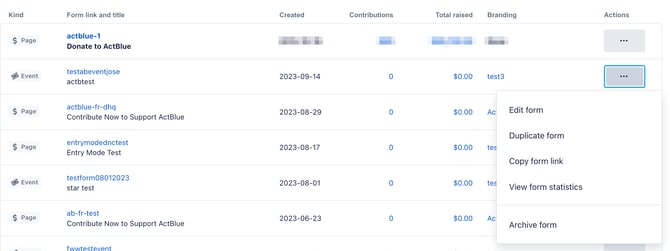
To do this, start by navigating to the Contribution Forms tab of your Dashboard. Next, locate the form you'd like to archive, click the grey dotted button under the Actions heading, and then select Archive Form from the options provided:
If you ever need to revive an archived form, simply return to your Contribution Forms page, locate your archived form, and click the black Restore button:

Please note that the default contribution form (or the form created with your ActBlue Dashboard when your account was first activated) cannot be archived. For more information on default forms, check out this guide!
Recurring contributions associated with archived forms will continue to bill.